
Download ArtIcons Pro – icon editor, icon creator, icon designer, icon management, icon tool
Overview
ArtIcons Pro, developed by Aha-soft, is a specialized productivity tool designed for users who require precise control over icon creation, editing, and management. Targeted at graphic designers, software developers, and digital content creators, the application serves as a comprehensive solution for crafting and organizing icons across various formats. Its primary purpose is to streamline the workflow involved in designing custom icons, offering both foundational and advanced tools to support creative and technical tasks. The software addresses common challenges such as format incompatibility, complex layering, and inconsistent visual quality by providing a unified environment for icon development.
Real-world use cases include designing application icons for desktop software, customizing system cursors, and preparing visual assets for digital projects. The tool is especially valuable in environments where branding consistency and visual clarity are critical. While the developer did not provide additional background on Aha-soft, the application’s long-standing presence in the market—since its release on February 15, 2011—suggests a stable and reliable product. ArtIcons Pro contributes meaningfully to the desktop productivity ecosystem by offering a focused, efficient alternative to general-purpose image editors for icon-specific workflows.
Key Features & Functionality
- Layer Support: ArtIcons Pro enables users to work with multiple layers, allowing for non-destructive editing and better organization of complex icon designs. This feature is particularly useful when building multi-element icons, such as those with foreground elements, backgrounds, and effects like shadows or gradients. Users can toggle visibility, reorder layers, and apply adjustments independently, enhancing both precision and flexibility.
- Multiple File Format Support: The software supports a wide range of formats including ICO, BMP, JPEG, ANI, CUR, PNG, XPM, PSD, and GIF. This versatility allows seamless import and export across different platforms and design pipelines. For example, a designer can import a PNG from a vector editor, edit it within ArtIcons Pro, and export it as an ICO file for use in a Windows application.
- User-Friendly Interface: The clean layout and intuitive navigation make the tool accessible to users with varying levels of experience. Menus and toolbars are logically arranged, minimizing the learning curve. Even users new to icon design can quickly locate essential functions, such as color pickers, resize tools, and layer managers.
- Advanced Editing Tools: Users can manipulate colors, gradients, shadows, and transparency with precision. These tools allow for high-quality visual refinements, such as adding depth or adjusting opacity for subtle effects. This level of control ensures that icons maintain visual appeal across different screen resolutions and display settings.
- Regular Updates: Aha-soft maintains ongoing development, releasing updates to improve performance, fix bugs, and introduce new features. This commitment supports long-term usability and ensures compatibility with evolving system standards and design practices.
Interface, UX & Performance
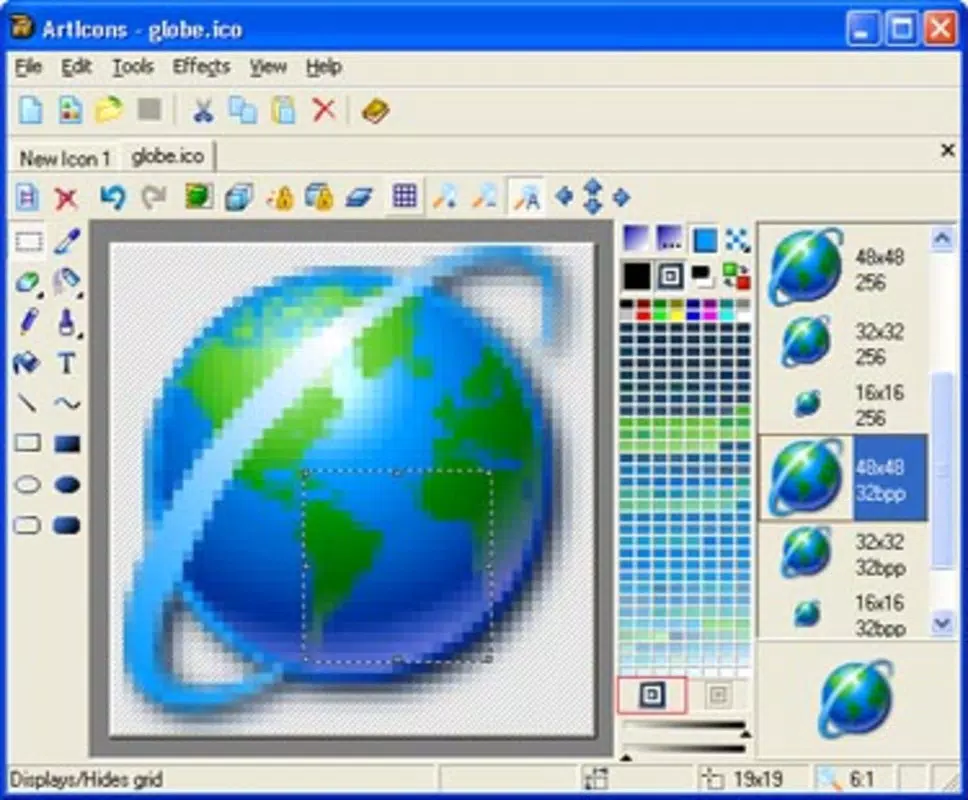
ArtIcons Pro features a streamlined interface with a focus on functionality and ease of access. The layout centers around a main canvas area, flanked by tool panels, layer lists, and property inspectors. Navigation is consistent across all workflows, reducing cognitive load and improving efficiency. The visual design is minimalistic, prioritizing usability over ornamentation, which aligns well with professional design environments.
Although the developer did not list formal performance metrics, the application’s lightweight size of 12.4 MB suggests efficient resource usage. It is expected to run smoothly on standard Windows systems, particularly those meeting basic desktop requirements. Responsiveness appears to be optimized for typical icon editing tasks, such as resizing, color adjustments, and layer management. Stability is likely maintained through regular updates, though no specific information on crash rates or memory consumption was provided. Users can expect consistent performance during routine operations, though complex projects may require more system resources.
Platform Compatibility & Technical Requirements
ArtIcons Pro is designed exclusively for the Windows platform. The current version, 6.51, has a file size of 12.4 MB, indicating a compact and lightweight installation. While the developer did not specify minimum OS requirements, the application’s release date of 2011 suggests compatibility with modern Windows versions, including Windows 10 and 11, as well as earlier iterations. However, users should verify system compatibility, especially when deploying on older or enterprise environments. The absence of detailed technical specifications means that no definitive claims can be made about processor speed, RAM, or GPU requirements.
Pros and Cons
Pros
- Comprehensive support for multiple icon formats including ICO, PNG, CUR, and GIF.
- Layer functionality enhances complex icon design and editing flexibility.
- Intuitive interface suitable for both beginners and experienced designers.
- Regular updates ensure ongoing functionality and feature improvements.
- Compact file size contributes to efficient storage and fast installation.
Cons
- Platform is limited to Windows; no support for macOS or mobile operating systems.
- Specific system requirements were not disclosed by the developer.
- Advanced features may require a learning curve for users unfamiliar with icon design workflows.
- Price point of $39.95 may be considered high for casual users.
- No information on cloud integration or collaborative features.
FAQ
Is ArtIcons Pro available for free?
ArtIcons Pro is not a free application. It is available for purchase at a price of $39.95. There is no publicly available free version or trial period mentioned in the provided information.
Can I use ArtIcons Pro on macOS or mobile devices?
Based on the available data, ArtIcons Pro is designed exclusively for the Windows platform. There is no indication of support for macOS, iOS, or Android devices.
What file formats does ArtIcons Pro support?
The software supports a wide range of formats, including ICO, BMP, JPEG, ANI, CUR, PNG, XPM, PSD, and GIF. This allows for both import and export across different design and development environments.
How often are updates released for ArtIcons Pro?
Aha-soft regularly updates the application to improve functionality and introduce new features. While the exact update frequency is not specified, the developer’s ongoing commitment to enhancements is noted in the product description.
Is ArtIcons Pro secure to download and install?
As a product developed by Aha-soft and distributed through official channels, ArtIcons Pro is expected to be secure. However, users should ensure they download the software from verified sources to avoid potential risks associated with third-party sites.
Final Thoughts
ArtIcons Pro stands out as a focused, capable tool for users who need to create, edit, and manage icons with precision. Its combination of layer support, multi-format compatibility, and a user-friendly interface makes it a strong choice for both professional designers and developers working on desktop applications. While its Windows-only availability and price point may limit its appeal to casual users, those requiring a dedicated icon editor will find significant value in its feature set and long-term reliability. The consistent updates from Aha-soft further reinforce its position as a dependable solution in the productivity category.
For anyone involved in icon design, system customization, or software development, ArtIcons Pro offers a robust and efficient workflow. Download ArtIcons Pro now


